Questarr

A video game management application inspired by the -Arr apps (Sonarr, Radarr, Prowlarr…) and GamezServer. Track and organize your video game collection with automated discovery and download management.














⭐ Star us on GitHub — your support motivates us a lot! 🙏😊




Table of Contents
List of features
| Feature |
Description |
| Backlog management |
Track your collection with status indicators (Wanted, Owned, Playing, Completed, Shelved), ratings, and notes. |
| Game Discovery |
Browse popular, new, and upcoming titles via IGDB, RSS feeds, and xREL.to, or sync your Steam wishlist directly into the app. |
| Search & Filter |
Find games by genre, platform, and keyword, with automatic search until a release is found, plus release blacklisting and preferred release groups/platforms. |
| Download Management |
Integrates with indexers and downloaders with optional auto-download and automatic post-processing import. |
| Real-time Notifications |
In-app alerts for releases and downloads, plus external notifications to 100+ providers via Apprise. |
| Rich Game Metadata |
Details enriched with IGDB, Steam, PCGamingWiki, and NexusMods, including trending mods where available. |
| Statistics |
Visualize collection statistics with Discord sharing support. 🚧 |
| Security Focused |
General security hardening, SSL support, and OpenSSF certified — see SECURITY.md for the full process. |
| Integrations |
Deployable on UNRAID and as a Home Assistant add-on. 🚧 |
| Design |
Clean, minimalist, dark-first UI built with mobile usage in mind. |
Supported Indexers/Downloaders
- Prowlarr synchronization is supported to add all your indexers at once.
- G4u.to: the site offers an API to VIP members, which can be used in Questarr.
| Indexers |
Downloaders |
| Torznab protocol (Torrent) |
- qBittorent
- Transmission
- rTorrent
- Deluge
- Synology Download Station |
| Newznab protocol (Usenet) |
- Sabnzbd
- Nzbget |
| G4U.to |
Same as Newznab |
Installation
Docker is the easiest way to deploy Questarr with all dependencies included. Questarr uses a SQLite database which is self-contained in the application container.
Option 1: One-liner (Simplest but minimal)
docker run -d -p 5000:5000 -v ./data:/app/data --name questarr ghcr.io/doezer/questarr:latest
Option 2: Docker Compose (more detailed)
-
Use the docker-compose.yml file from the repo or create a minimal one:
services:
  app:
    image: ghcr.io/doezer/questarr:latest
    ports:
      - "5000:5000"
    volumes:
      - ./data:/app/data
    environment:
      - SQLITE_DB_PATH=/app/data/sqlite.db
    restart: unless-stopped
-
Start the application:
-
Access the application:
Open your browser to http://localhost:5000
UNRAID
Install via Community Applications
Questarr ships an official Community Applications template ([`unraid/questarr.xml`](/Questarr/unraid/questarr.xml)):
1. In the UNRAID web UI, open the **Apps** tab and search for **Questarr**.
2. If it doesn't show up there yet, go to **Docker → Add Container**, enable **Template repositories**, and a
dd:
`https://raw.githubusercontent.com/Doezer/Questarr/main/unraid/questarr.xml`
3. Set your **Data Path** (default `/mnt/user/appdata/questarr`), **PUID**/**PGID**, and ports (default `5000
` HTTP, `9898` HTTPS).
4. Apply, then open `http://:5000` to access the UI.
</details>
### Home Assistant Add-on
Install as a Home Assistant add-on
You can install Questarr as a Home Assistant add-on from this repository:
1. In Home Assistant, open **Settings → Add-ons → Add-on Store**.
2. Click the menu (⋮) and choose **Repositories**.
3. Add this repository URL: `https://github.com/Doezer/Questarr`
4. Install the **Questarr** add-on and start it.
5. Open `http://:5000` to access the UI.
</details>
## Screenshots
👀 See the app in action
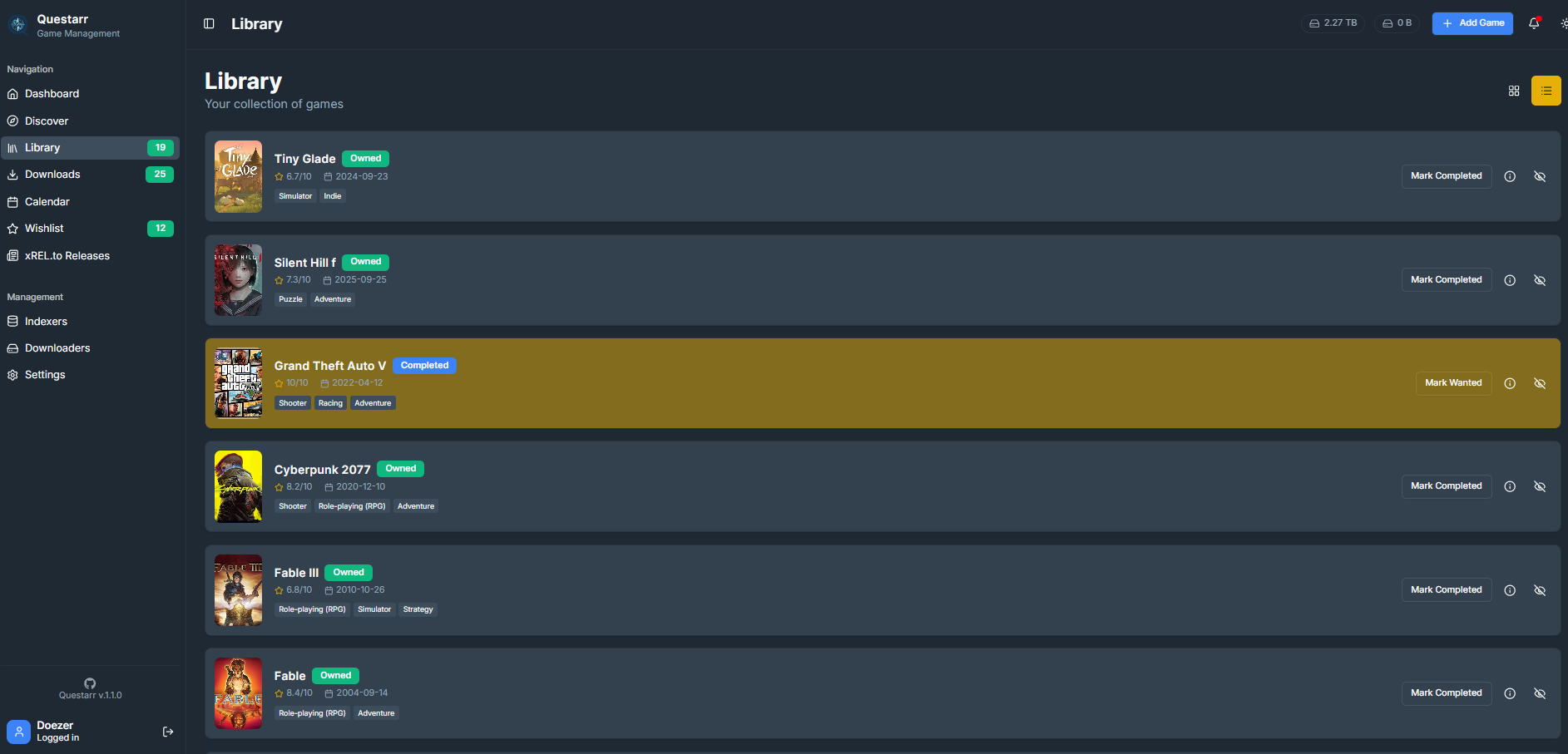
### Library
Your central hub for recent activity, collection overview and downloading available games. Manage your owned and wanted games.


### Wishlist & Release calendar
Manage your wanted games and when they release.


### Discover Games
Browse and find new games to add to your collection.
 #### RSS & xRel.to feeds
Custom RSS feeds and xRel.to flux matched to IGDB games directly into the app. Default RSS is set to fitgirl site.
#### RSS & xRel.to feeds
Custom RSS feeds and xRel.to flux matched to IGDB games directly into the app. Default RSS is set to fitgirl site.


### Downloads Queue
Monitor your downloaders' active downloads and history.
 ### Statistics
Check out your library statistics.
### Statistics
Check out your library statistics.
 ### Settings
Configure indexers, downloaders, and application preferences.
### Settings
Configure indexers, downloaders, and application preferences.


## Tech Stack


[](package.json)
[](https://www.typescriptlang.org/)
[](#installation)
[](#installation)
- **APIs**: IGDB (game metadata), Torznab/Newznab (indexer search), PCGamingWiki, NexusMods, xREL.to
- **AIs usage**:
- Claude and Github Copilot are used for AI-Assisted coding, internal code reviews, PR cleanup. Eventually automated coding and troubleshooting for small tasks and bug reports.
- Gemini & Codex are used for automated code reviews, and brainstorming from time to time (as well as Perplexity for this usage).
- Google Jules is used for light periodical refactoring.
## Configuration
1. **First-time setup:**
- Create your admin account
- Configure the IGDB credentials
Once logged-in:
- Configure indexers
- Add downloaders
- Add games!
See [Configuration on the Wiki](https://github.com/Doezer/Questarr/wiki/Configuring-the-application#configure-app-behavior-in-settings--general) for more detailed info.
Getting IGDB API Credentials
IGDB provides game metadata (covers, descriptions, ratings, release dates, etc.).
1. Go to [Twitch Developer Console](https://dev.twitch.tv/console)
2. Log in with your Twitch account (create one if needed)
3. Click "Register Your Application"
4. Fill in:
- **Name**: Questarr (or any name)
- **OAuth Redirect URLs**: `http://localhost` (not used, but required)
- **Category**: Application Integration
5. Click "Create"
6. Copy your **Client ID** and **Client Secret**
7. Add them to your `.env` file
Upgrading from v1.0 (PostgreSQL)
If you are upgrading from an older version that used PostgreSQL, you need to migrate your data.
1. **Stop your current application:**
```bash
docker compose down
```
2. **Get the migration tools:**
Download the [`docker-compose.migrate.yml`](https://raw.githubusercontent.com/Doezer/Questarr/main/docker-compose.migrate.yml) file to your directory.
3. **Run the migration:**
This command spins up your old database and converts the data to the new format automatically.
```bash
docker compose -f docker-compose.migrate.yml up --abort-on-container-exit
```
4. **Update your deployment:**
Replace your `docker-compose.yml` with the new version (see "Fresh Install" above).
5. **Start the new version:**
```bash
docker compose up -d
```
See [docs/MIGRATION.md](/Questarr/docs/MIGRATION.html) for more details.
Advanced usage
### Docker compose
This is mainly for users who want the latest commit (e.g when trying out fixes for an issue) or contributing users.
1. **Clone the repository:**
```bash
git clone https://github.com/Doezer/Questarr.git
cd Questarr
```
1. **Configure the application:**
Edit `docker-compose.yml` directly if you need to setup a specific environment.
1. **Build and start the containers:**
```bash
docker-compose up -d
```
1. **Access the application:**
Open your browser to `http://localhost:5000`
### Update to latest version for Docker
Your database content will be kept.
```bash
git pull
docker-compose down
docker-compose build --no-cache
docker-compose up -d
```
## Roadmap
Based on the [Product Requirements Document](/Questarr/docs/PRD.html), here's what's planned over the next 6 months, in priority order:
- ✅ **P0 — Post-Processing Pipeline** : Move/copy completed downloads to a destination path, extract archives — closing the "set it and forget it" loop.
- **P1 — Smart Game Backlog**: Track the version of each downloaded game and notify (or auto-download) when a newer release shows up on indexers.
- **P2 — Direct Download Support**: Add debrid services (Real-Debrid and similar) as a downloader option, no seeding required.
- **P3 — External Library Sync**: Import owned games from Steam/GOG libraries and local filesystem scans, not just wishlists.
- **P4 — Integrations with External Tools**: Playnite, RomM, Gameyfin, and a generic webhook for anything not explicitly supported.
- **P5 — Indexer Page Links**: A "View on indexer" link on search results and downloads.
- **P6 — PostgreSQL Support**: Re-introduce PostgreSQL as an optional backend, with SQLite remaining the zero-config default.
**Ongoing:** mobile responsiveness, search UX, performance, and security improvements.
See the full [PRD](/Questarr/docs/PRD.html) for problem statements, detailed scope, and non-goals.
## Troubleshooting
See [Troubleshooting on the Wiki](https://github.com/Doezer/Questarr/wiki/Troubleshooting)
If you run into an issue, go to the **Logs** page and click **Send Logs** before reporting it — it makes diagnosing the problem much easier.
### Getting Help
- **Issues**: [GitHub Issues](https://github.com/Doezer/Questarr/issues)
- **Discussions**: [GitHub Discussions](https://github.com/Doezer/Questarr/discussions)
- **Discord**: [Join our Server](https://discord.gg/STkp86wP9F)
## Project Security & Documentation
- Start with [docs/GITHUB_DOCUMENTATION.md](/Questarr/docs/GITHUB_DOCUMENTATION.html) for the canonical documentation map.
## Contributing
- See [.github/CONTRIBUTING.md](.github/CONTRIBUTING.md) for guidelines on how to contribute to this project.
- See [MAINTAINERS.md](/.github/MAINTAINERS.md) for the current list of project members with access to sensitive resources.
### Contributors
 Made with [contrib.rocks](https://contrib.rocks).
## License
GPL3 License - see [COPYING](/Questarr/COPYING) file for details.
## Acknowledgments
- Inspired by [Sonarr](https://sonarr.tv/) and [GamezServer](https://github.com/05sonicblue/GamezServer)
- Game metadata powered by [IGDB API](https://www.igdb.com/)
- UI components from [shadcn/ui](https://ui.shadcn.com/)
Made with [contrib.rocks](https://contrib.rocks).
## License
GPL3 License - see [COPYING](/Questarr/COPYING) file for details.
## Acknowledgments
- Inspired by [Sonarr](https://sonarr.tv/) and [GamezServer](https://github.com/05sonicblue/GamezServer)
- Game metadata powered by [IGDB API](https://www.igdb.com/)
- UI components from [shadcn/ui](https://ui.shadcn.com/)